


Low latency is the minimal delay between a system’s input and its response. For example, when you click a button or give a command, there’s little to no noticeable delay before the system react, usually just a few thousandths of a second (milliseconds).
You are watching the T20 World cup and your favorite team is a touchdown away from winning the cup. You’re waiting for the broadcast after the regular commercial.
But by then, your neighbors start screaming about the victory! Gone. Your screen freezes.
You missed the win in real time. Why?
Because your network was slow. The stream staggers and comes back, yet the moment’s gone!
This occurs when the network faces a delay in delivering the streaming data to your device. This delay is what we call “Latency”
In the post below, let us briefly discuss what latency is, how it can be reduced, and the tools you need to achieve low latency.
What Is Low Latency?
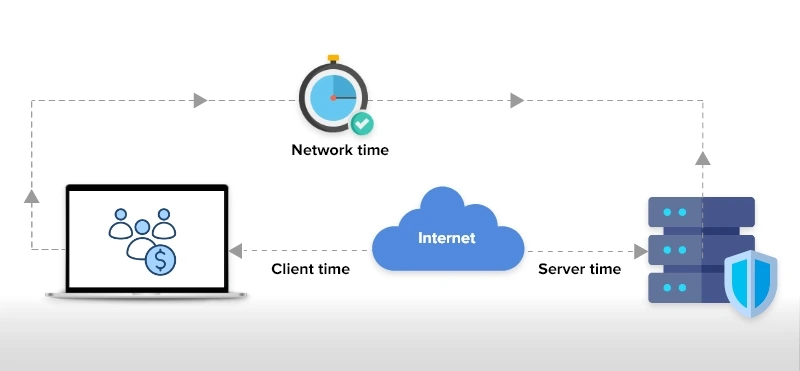
Low latency is defined as the minimal delay that happens between an action and a result.
It is important to maintain a good latency and low jitters so users watching a live video stream, talking over the phone or sending messages have a smooth and responsive experience.
This is especially influential in time-sensitive scenarios where real-time software depend on low latency systems for live-streaming, high-frequency trading, and online gaming.
At any cost, the latency cannot go up during critical remote operations like drone control or medical conversations.
What Is High Latency?
High latency is when the time taken for the data to travel between a request and a response is longer. This eventually makes apps and systems perform slower and sometimes unresponsive, affecting user engagement dramatically.
When the latency is high in websites and web apps, it may slow down the pages and increase bounce rates. Similarly, on calls/messages, the receiver may get the response from the sender after a long gap, causing a huge discomfort during conversations.
Low Latency vs. High Latency: What’s the Difference?
Response time is the key factor that distinguishes low latency from high latency.
At low latency, data moves quickly and the response feels instantaneous.
On the other hand, at high latency, you’ll experience lags and delays. To be precise, latency is the delay that happens when data travels from your device to a server and back.
| Aspects | Low Latency | High Latency |
|---|---|---|
| Definition | Minimal delay between input and response, typically measured in milliseconds | Significant delay between input and response, ranging from hundreds of milliseconds to seconds |
| Response Time | Under 50ms (excellent), 50-100ms (good) | Over 150ms, often 300ms+ |
| Best For | Video calls, live streaming, online gaming, VoIP, real-time chat | Email, file downloads, batch processing |
| Example Scenario | Instant response during a live video call | Delay when sending or receiving an email |
What Causes High or Low Latency?
Several factors affect latency:
- Distance: Data takes longer to travel over greater physical distances.
- Connection type: Fiber-optic connections usually have lower latency than wireless or copper.
- Network hops: Each router or switch adds a small delay.
- Network congestion: Heavy traffic can cause bottlenecks and slow responses.
Types Of Latency
While latency is a single factor, the causes of latency are numerous. There are various reasons for a delay to happen during data transmission.
Based on these reasons, we can group them into 4 different categories.
- Propagation Delay – A data physically travels from a source to destination. The delay caused during this phase is known as the propagation latency.
- Transmission Delay – All the data: large and small, has to be pushed into the network for a connection to happen. The delay which happens when pushing these data is known as the transmission latency or transmission delay.
- Processing Delay – Once the data enters the network, routers must check the packet headers, and sometimes split the packets. Here, ping works on the ICMP network protocol to measure basic connectivity and response delays. Later, when the data enters the server, it might take some time to generate a response. The delay that occurs during these processing phases are termed as processing latency.
- Queuing Delay – When the network is busy, some data packets must wait in the buffer. There are scenarios where multiple packets arrive at the same time and a congestion might happen. This causes the queuing delay, and the prolonged or extreme cases of this delay is known as the buffer bloat. This is one of the severe-impact delays in data transmission.
What Causes Network Latency?
A delay may occur due to physical and technical factors when data travels from one location to another. Let’s take a quick look at some of the most important factors that likely cause latency in real-time conversations and remote operations.
- The distance data needs to travel: Even if the network quality is high, when the server is farther from your device, the delay might be longer.
- Which medium the data travels: Data can travel in different physical mediums: Fiber-optic cables, copper cables or wireless transmitters. Generally, the delay is less across fiber-optic cables. Other mediums usually cause high latency. On the other hand, the data has to cross different devices like routers, switches, and firewalls. While crossing each device, a small delay called network hop occurs. You can use traceroute to identify network hops where latency increases especially across routers and switches.
- Hardware and server performance: Even slow servers or overloaded systems can be a reason for delay. They might take more time to process the requests and generate responses. Similarly, if you use an older hard drive, the storage speed might be slower, eventually affecting the time it takes for the data to move.
- Design of the software or app: If your video calling app or a messaging platform has too many images, videos and uncompressed files, or runs on an inefficient video codec, it might impact the speed of data. Also, unoptimized or bloated code can lead to unnecessary delay in data transmission.
- Factors in the user-side: At the user’s end, poor Wi-Fi connections, outdated routers or old versions of firmware might slow down the performance of your video or audio calling apps.
- Bandwidth: If you have a higher bandwidth, your data will travel faster. A higher bandwidth means faster delivery and minimal traffic.
- Use of Encoder: Encoders must be optimized in such a way that it instantly pings a signal to the receiver.
- Optic Fibers: The connection type influences data transmission. We suggest you use optic fibers instead of wireless internet. Usually, Fiber-based low latency connectivity improves real-time streaming, live video conferencing and VoIP performance.
- Long Distance: See that you are located at a closer distance from ISP, satellites, and internet hubs. Because long distances can increase the delay.
- File Size: A larger file size takes a long time to transmit data via the internet, thereby increasing the streaming latency.
How Is Network Latency Measured?
Network latency is commonly measured in milliseconds (ms) and in fast systems like fiber-optic networks or high-performance hardware, it may be measured in microseconds (μs).
Common Network Latency Metrics
The most widely used latency measurement is Round-Trip Time (RTT). RTT represents the total time it takes for a data packet to travel from a source to a destination and back again.
Another important metric is Time to First Byte (TTFB). This measures how long it takes from the moment a connection is made until the first byte of data is received.
One-way latency measures the time it takes for data to travel in a single direction. While this can provide more precise insight into where delays occur, it is harder to measure because it requires accurate time synchronization between systems.
Tools Used to Measure Latency
One of the easiest ways to check delay on a network is a tool called ping. It sends a tiny test message to another system and measures how long it takes to get a response back.
This is helpful for a quick check, but it’s not that perfect or accurate because these test messages may be handled differently than real app traffic.
For more accurate results, engineers use tools like Iperf, Netperf, or hping. These tools act more like real users and applications, giving a far more better picture of actual performance.
In real systems, you can often measure latency jitters using percentiles (like the 99th percentile) to show how bad delays can get, since simple averages can hide occasional slowdowns.
How To Reduce Latency?
Reducing latency in any real-time environment involves optimizing infrastructure, protocols, video codecs, and network routing.
Additionally, these steps can also improve high latency levels:
- Using smart network interface cards (NIC) and programmable network switches.
- Identifying and monitoring the IT infrastructure using network monitoring tools help detect latency, packet loss, and congestion in real time.
- Analyzing the networking issue and investing in cloud infrastructures.
- Use of streaming protocols like WebRTC, RTMP, and FTL for delivering low-latency video calling and streams.
- Use of APIs as any voice or video API providers will make sure to design their codes with minimal latency. So, try to integrate API providers like MirrorFly to your chat platforms for seamless and smooth audio/video transmissions.
- An experienced web developer or skilled tech-stack professional who knows code minification to reduce the loading time. And finally,
- Evaluate which network function can be off-loaded to a Field Programmable Gate Array (FPGA).
So far we saw what best can be done to reduce the latency of your live streams, but the actual elephant in the room is the latency solutions for different use cases.
Where Low Latency Cannot Be Compromised?
When it comes to real-time applications, the issue with high latency can mostly ruin the potential engagement on a platform.
So, it is very important for any application requiring low latency value to retain and improve overall customer engagement.
Here we will see the situations where low latency is called for:
- Online Video Games: Gamers need to chat with their peers instantly and the games they play on any device must reflect the action in real time without any lag. In case of high latency, gamers are not going to stick to your product.
- E-learning: Have you thought about if there is a lag when a live classroom session is on, what will happen to students learning? Then your app will not do any good to their education.
- Healthcare Apps: These days, healthcare organizations are developing their own custom healthcare apps for consultations to connect doctors and patients over a video-enabled VoIP calls. In case they encounter a lag in video reception, they are going to go in person.
- Enterprise Chats: When remote work was a boon, real-time chat apps were in great demand. Reliable IP communications enable real-time voice and video collaboration in enterprise environments. A delay due to a network issue is going to burden their workload.
- High-Frequency Trading: Today, low-latency trading in the financial market is a regular practice. It has opened up ways for unique advantages in network services. Here, the latency is used to get the information faster than any other trader.
Apart from these applications, companies are taking low latency as a critical factor when developing their live shopping apps, social platforms and dating apps.
How MirrorFly Helps Build Low-Latency Chat & Calls?
MirrorFly helps developers build low latency chat and calls by providing a full real-time communication platform with optimized SDKs, scalable infrastructure, and real-time protocols that are designed for performance and responsiveness.
Here is how it achieves that:
1. Real-time communication protocols (WebRTC/WebSockets)
- MirrorFly’s voice and video communication features rely on WebRTC and real-time messaging protocols designed specifically for instant communication.
- Its WebRTC video calling supports direct peer-to-peer media streaming with minimal buffering, reducing latency for both voice and video traffic.
- WebSockets are often used for instant message delivery, ensuring messages are sent and received in real time rather than through periodic polling. This core design is key to low-latency performance.
2. Optimized SDKs for multiple platforms
- The platform uses globally distributed servers and infrastructure that manage signaling, routing, and scaling for millions of concurrent users.
- By reducing geographical distance and intelligently routing traffic, it can keep latency low even for users spread across regions.
- MirrorFly also offers self-hosting options. Deploying a low latency server closer to users significantly reduces response delays.
3. Efficient API responses and uptime guarantees
- MirrorFly boasts fast API responses (often <100 ms) and high availability (up to 99.999% uptime).
- MirrorFly’s fast API integration with a robust uptime help ensure that chat message delivery and call setup happen quickly and reliably, which contributes to a smoother real-time user experience.
4. Adaptive media handling
- For calls, MirrorFly’s voice and video SDKs use adaptive bitrate streaming and network handling techniques that adjust video and audio quality based on the network conditions, minimizing lag or freezing even on less reliable connections.
- This responsiveness is central to keeping perceived latency low.
5. Pre-built UI and features for quick integration
- Pre-built UI kits and easy-to-use components let developers integrate communication features quickly without heavy custom coding, which reduces development overhead and helps deliver a working low-latency solution faster.
6. Customizable hosting and data ownership
- If you self-host MirrorFly on your own servers or private cloud, you retain full control over routing and server logic.
- Hosting closer to users or in a controlled environment can lower latency compared to relying solely on a third-party cloud.
In summary, MirrorFly helps build low-latency chat and calls by combining real-time communication protocols, optimized multi-platform SDKs, globally scalable infrastructure, fast APIs, adaptive media handling, and flexible deployment options.
Besides, the solution also comes with custom voice agents and AI chatbots solution that drive billions of low-latency communication.
This way, you can add reliable, responsive communication features in your apps without building the complex backend yourself.
Want to know more about building low-latency video calling with MirrorFly? Contact our experts today!
Drive 1+ billions of conversations on your apps with highly secure 250+ real-time Communication Features.
Contact Sales 200+ Happy Clients
-
Topic-based Chat
-
Multi-tenancy Support
 200+ Happy Clients
Frequently Asked Questions (FAQ)
Low latency is essential for delivering smooth, fast, and responsive user experiences and allowing participants to communicate without any delays in real time. If the issues related to high latency persist on using an application then users can get frustrated and shift to another application permanently.
Yes. Low latency is usually considered to be the best as users can communicate with each other or with the application without any delays or lags. Additionally, having a low latency level of anywhere between 40 to 60 ms is highly acceptable as it can improve the overall user experience and help deliver fast and seamless responses.
A low latency video is a video content that has a very low delay between when an image or video is captured in the camera and when it is displayed to viewers. In general, a low latency video is said to have a latency of less than 1 second and to achieve this level, many protocols like WebRTCs and DASH are often used.
Some of the best ways to reduce video latency and improve the quality of video calls are by increasing the bandwidth, using high-quality hardware such as high-resolution camera, using a video encoder and decoder, planting a CDN to reduce the distance between server and viewer, and using adaptive streaming protocols like HLS, DASH, and WebRTC.
A good latency speed is the shortest duration a data takes to reach the destination from the source. The lower the latency, then better the performance and a latency rate of below 100ms is considered to be great for real-time applications.
You can take the following steps to improve the video latency:
- Increasing the bandwidth and internet speed
- Moving closing to a server
- Restarting or replacing your router
- Using a CDN to distribute traffic
- If possible use a wired connection instead of a Wi-Fi
- And, improving the encoding process with the help of a codec
Further Reading
- How to Build A Flutter Video Call App in 2026?
- Video communication: what it is and how it works?
- How to Build a React JS Video Chat App in 2026?
- How to Build an Android Voice and Video Calling App Using Java?
- Communication APIs: Top 7 In-app Chat, Voice & Video APIs
- WebRTC Video Call API: The Definitive Guide
 Atchaya Jayabal leads Content at MirrorFly and is an expert in writing Tech, SaaS & B2B. She regularly publishes articles on CPaaS & Conversational AI in blogs.