


A step-by-step guide on building custom LLM chatbot apps for web or mobile.
An LLM chatbot is an AI conversational agent that incorporates capabilities beyond basic question and answer interactions. They manage conversational context, access external knowledge sources to generate factual responses, and handle real-time messaging without hallucinating.
In this article, we will discuss the steps to build a custom LLM chatbot, with pre-built solutions like MirrorFly.
Before you start with the development steps, here is a simple explanation on the key components that make an LLM chatbot.
Key Components of an LLM Chatbot
LLM Chatbot Apps have 4 main components:
- Large Language Models (LLMs)
- Prompt Engineering + Templates
- Retrieved Augmented Generation (RAG)
- Application Framework and Orchestration
1. Large Language Models (LLMs)
The first component – LLMs are transformer-based neural networks that typically act as the brain of the chatbot. These models are built based on the Transformer Architecture (2017) to handle vast amounts of data.
A conversation (with your chatbot) involves multiple words. These words need to be in a specific pattern and structure to help your bot understand the context and respond accordingly. LLMs train the chatbots to comprehend these words, interpret the user intent and generate new content (knowledge) in human-like text.
2. Prompt Engineering and Templates
Prompts, the user instructions in plain language highly influence the LLM behavior. They are required to be in a specific format (combination of raw user input + context) to help the LLM process the instruction effectively.
We’d recommend you to explore advanced techniques like Chain-of-thought (CoT) prompting and ReAct (Reasoning + Acting) prompting to make your chatbot deliver refined responses with multi-step reasoning.
3. Retrieval Augmented Generation (RAG)
There are high chances that your chatbot might hallucinate if it does not have the data beyond the LLM-trained data. This is tremendously risky and might put your business at stake.
To avoid this, you’ll need to develop chatbots that are capable of accessing external knowledge to deliver up-to-date and factual information. Retrieval Augmented Generation (RAG) helps you achieve it. It is a technique that carries out knowledge augmentation to help chatbots get information outside its trained data.
RAG works in 2 stages
Stage 1: Data Indexing
In this stage, RAG collects information from multiple sources like PDFs and CSVs and segments them into small chunks of data.
These data chunks are then converted into vector format (numerical representations) known as embeddings.
The embeddings are then saved in the vector database of the chatbot.
Stage 2: Data Retrieval
When a user asks a query, RAG’s retriever module uses a technique called cosine similarity to search if there are any vectors similar to the user query, in the vector database.
Once the module spots a vector similarity, RAG’s generator module combines the retrieved content and user query to generate a contextually accurate response.
4. Application Frameworks and Orchestration
Libraries/ Frameworks:
Your LLM takes care of the internal flow and data while RAG handles the external data. How do you connect them both in your chatbot development environment? You’ll need modular components.
These components are available in your LLM chatbot libraries. The libraries are the frameworks that handle user prompts, manage agent conversations, keep message history and monitor the chatbot state across multiple turns your chatbot takes to answer a customer.
Popular libraries include LangChain and LangGraph.
Chains and Agents
The prompts, parsers and models are interconnected in language models. A LangChain Expression Language (LCEL) connects them all. These connections help establish a sequence of calls known as Chains.
When a user requests a complex query, the language model uses chains to decide upon the next best action in a conversation sequence.
Such sequencing processes are referred to as Orchestration.
Choosing the Right Tools & Models
When you build an LLM chatbot, you’ll require a stack of tools for development, data storage and deployment. They include:
- Core Language Models (LLMs)
- Development Frameworks and Orchestration
- Data Storage and Retrieval Tools
- User Interface (UI) and Deployment Tools
- Utility and Supporting Tools
Let’s take a quick look at them.
1. Core Language Models (LLMs) Tools
For any LLM Chatbot, a language model acts as a core component of the architecture. These models are available in 2 ways for developers:
- Proprietary/ Commercial LLMs
- Open-source/ Open access LLMs
Proprietary LLMs are the pre-built models that are created and controlled by major tech companies. You’ll either need an API key or commercial platform to access these models.
Some of the popular proprietary LLM models include:
- GPT series by OpenAI
- Gemini by Google
- Claude by Anthropic.
Open-source LLMs are highly suitable for developers who prefer independent development and customization options. You have the freedom to fine-tune the models and deploy them as per business requirements.
Here are a few open-source LLM models that you might find useful:
- BLOOM available in Huggingface
- LLaMA/ LLaMA 2 by Meta
- RAG (Retrieval Augmented Generation) models by Mistral AI
- Foundation models for Pre-LLM era like BERT or Encoder/ Decoder architecture
2. Development Frameworks and Orchestration Tools
Your chatbot needs an architecture. To implement each part of the architecture, you’ll need to derive structures. Across each structure, you’ll bring upon tools + technologies to build your chatbot. This combination of structures, tools and technologies is referred to as Development frameworks.
These frameworks take care of your chatbot’s workflow , handle prompt management and connect with external data to expand your chatbot’s capabilities and knowledge.
Some of the key frameworks include LangChain, TeamsAI Library, Rasa and YAML-based Domain Specific Language (DSL).
Besides your development framework, you’ll need a clear picture of how the data flows in your chatbot, the sequence of logic and the deployment of the entire system. This overview of the process is known as Orchestration.
In LLM Chatbot development, there are 2 types of orchestration:
- Internal flow – Application logic orchestration
- External deployment – Deployment + Infrastructure orchestration
In the internal flow, orchestration dictates how the chatbot handles a query, maintains context and decides which action (or tool) to use in the sequence.
Some of the popular orchestration components include LangChain Expression Language (LCEL), Agents for dynamic decision making, LangGraph, State Machines, and The AI System Planner in the Teams AI Library.
In the external flow, orchestration manages how the distinct parts of the app (APIs, database and frontend) are deployed and interact with each other.
Some of the widely-used orchestration tools include Docket Compose, Kubernetes, and Helm Charts.
3. Data Storage and Retrieval Tools
If your chatbots need to deliver responses with contextual relevance, accuracy and factual grounding, they need access to vast amounts of data. Data storage and retrieval tools help them fetch these information from proprietary storage, and real-time conversations.
Some of them incorporate the Retrieval-Augmented Generation (RAG) approach to even extend the research to external knowledge sources.
To store the proprietary or in-app data, the system can use a general database or a vector database.
A general database is the default infrastructure that stores that data associated with application function and user management. Example: MongoDB
A vector database is a specialized system that stores text chunks of a conversation in the form of numerical vector representations known as embeddings, along with meta-info to index the data so the chatbot can find similar results from the database. Example: ChromaDB, Neo4j Vector Index.
4. User Interface (UI) and Deployment Tools
UI tools in an LLM chatbot helps you present the conversational agent to app users in a more accessible and engaging way. The easiest way to get this done is by using a pre-built framework or UI SDK.
Example: Streamlit, Gradio, Microsoft Teams AI Library, or MirrorFly UI SDK
Once your LLM Chatbot is developed, you’ll need tools to serve the app, and manage its execution environment. This is where deployment and infrastructure tools come in.
Popular platforms include:
- Web frameworks & APIs – FastAPI
- Orchestration and Containerization – Docker and Docker Compose
- Continuous Integration and Scaling – CI/CD Pipelines, Kubernetes, Helm and Spinnaker
- Monitoring and Tracing – LangSmith
- Hosting Platforms – Hugging Face Spaces, Cloud Resources
5. Utility and Supporting Tools
These tools are additional components that enhance the development process, manage the configuration and support in debugging the chatbots.
They include LangSmith, Python-dotenv (Dotenv), Output Parsers (StrOutputParser) and Tools (in Agents).
How to Build an LLM Chatbot in 6 Steps
There were times when a chatbot could only handle questions and answers, that too only pre-trained. But the rise of LLMs around the 2020s changed the way businesses interact with customers and users.
Chatbots started having human-like conversations leading to a more personalized and contextually relevant support. Now, there are 3 ways to build such intelligent chatbots with LLMs.
1. Intent-based Technologies (The traditional approach)
- This approach is used to build task-oriented chatbots that explicitly rely on the user instructions. The resulting chatbot responses of these chatbots may feel artificial and repetitive.
2. Direct API Interaction with monolithic prompts
- In this approach, developers need to create comprehensive text prompts containing all the instructions, context and conversation history that your chatbot needs to generate a response. Creating this prompt is often not possible without technical expertise in prompt engineering
3. Declarative approach using SDKs & DSL
- This newer method requires developers to create modular, declarative definitions in the YAML syntax and then compile them into structured LLM prompts. Here an SDK like MirrorFly takes acts as a bridge between the raw LLM capabilities and production-ready apps.
In this section, we will look into the details of how to develop an LLM chatbot in the declarative approach using MirrorFly AI Chatbot Solution.
Step 1: Set up MirrorFly AI Agent Solution
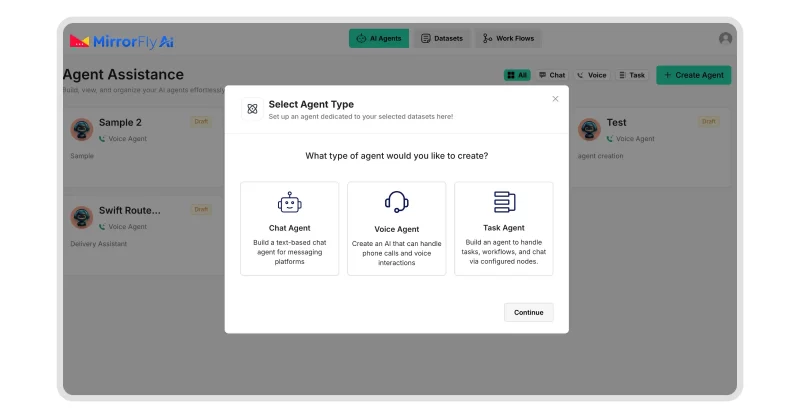
The initial setup process for building an LLM chatbot with MirrorFly AI solution begins with proper installation and configuration.
To get started,
- Contact MirrorFly Team
- Create an account
- Get the AI Agent License Key
- Install the solution in your IDE (Android Studio, VS Code, Xcode, etc.).
- Configure the Solution:
- Set up environment variables.
- Add authentication parameters (API keys, tokens).
- Connect to external services (if needed).
- Choose your deployment model: on-premise, cloud, or hybrid.
Step 2: Connect with an LLM Provider
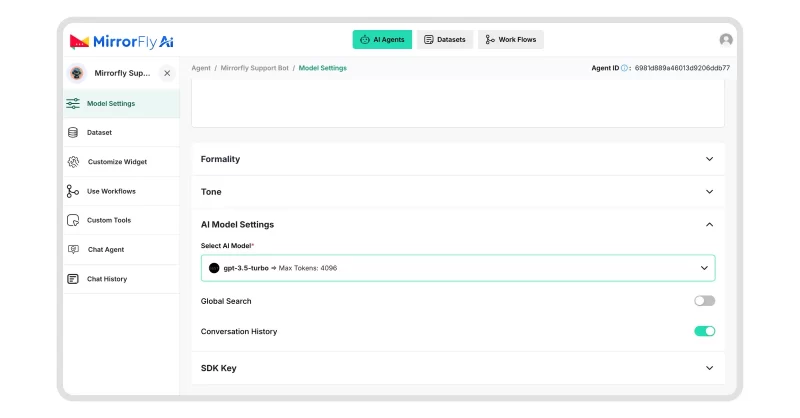
- Pick your preferred LLM provider (OpenAI, Claude, Gemini, Hugging Face, Llama, Mistral, etc.).
- Get API credentials from that provider.
- Add the API credentials into your app securely.
- Configure model parameters (temperature, max tokens, etc.).
- Implement prompt/response flow:
- Send user input to the LLM API.
- Receive and display the response.
- Set up switching logic if you plan to use multiple LLM providers.
Step 3: Create Chat Interface
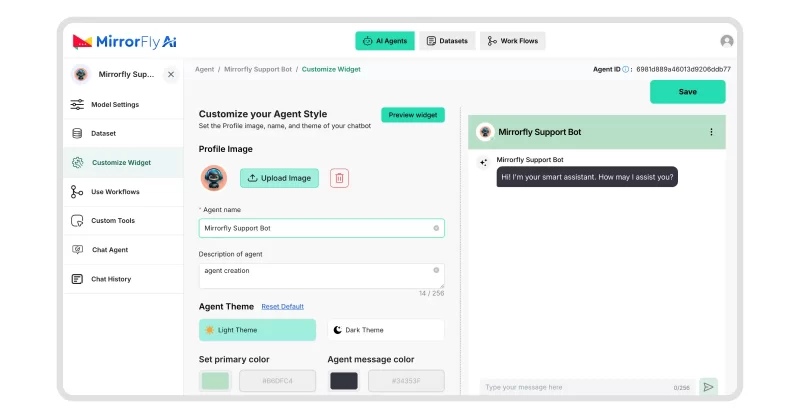
- Build the UI for user input (text box) and chatbot replies (chat bubbles).
- Add typing indicators to show when the bot is responding.
- Show message delivery status (sent, delivered, read).
- Enable support for images, videos, and files if needed.
- Add streaming response display so answers appear as they are generated.
Step 4: Add Real-time Communication Features
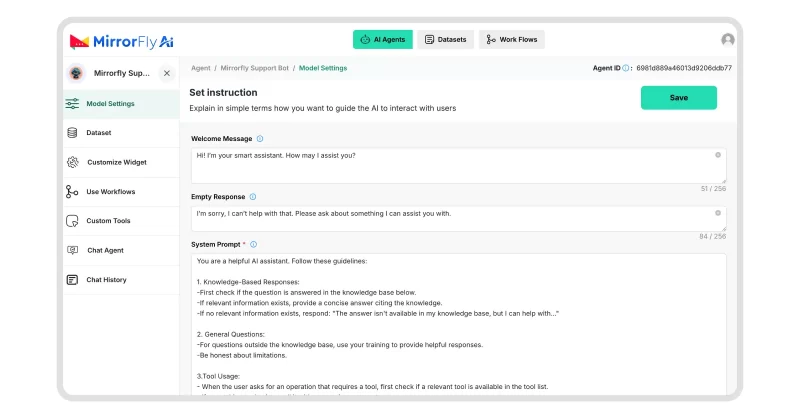
- Enable voice or video calling integration using MirrorFly APIs.
- Set up single-user or multi-user/group conversations.
- Implement WebSocket connections for real-time messaging.
- Handle streaming data chunks to update UI as responses arrive.
- Add error handling for network interruptions or timeouts.
- Track user conversation history and preferences.
- Manage topic changes and maintain relevant context.
- Use predictive features to make interactions smoother.
Add Advanced Features and Capabilities:
Retrieval-Augmented Generation (RAG) Implementation
- Process and chunk your documents.
- Create embeddings and store them in a vector database.
- Add semantic search to fetch relevant info.
- Pass retrieved context along with user queries to the LLM.
RAG Implementation Example:
class RAGChatbot:
    def __init__(self):
        self.vectorstore = self.setup_vectorstore()
        self.retriever = self.vectorstore.as_retriever()
        self.llm_chain = self.setup_rag_chain()

    def setup_rag_chain(self):
        prompt_template = """
        Use the following context to answer the question:
        {context}

        Question: {question}
        Answer:
        """

        return create_retrieval_chain(
            retriever=self.retriever,
            llm=self.llm,
            prompt=prompt_template
        )

    async def process_query(self, user_query):
        # Retrieve relevant documents
        relevant_docs = await self.retriever.aretrieve(user_query)

        # Generate response with context
        response = await self.llm_chain.ainvoke({
            'context': relevant_docs,
            'question': user_query
        })

        return response
Multi-Modal Integration Capabilities
- Enable speech-to-text and text-to-speech features.
- Add video call support for interactive sessions.
- Support file sharing and media messages.
Step 5: Implement Security & Data Controls
- Add user authentication and access control.
- Encrypt data in transit and at rest.
- Make sure the system follows GDPR, HIPAA, or other compliance needs.
- Do not store user inputs for retraining models unless permitted.
- Add consent mechanisms and data retention controls.
- Enable audit logging for sensitive actions.
Step 6: Deploy Your App
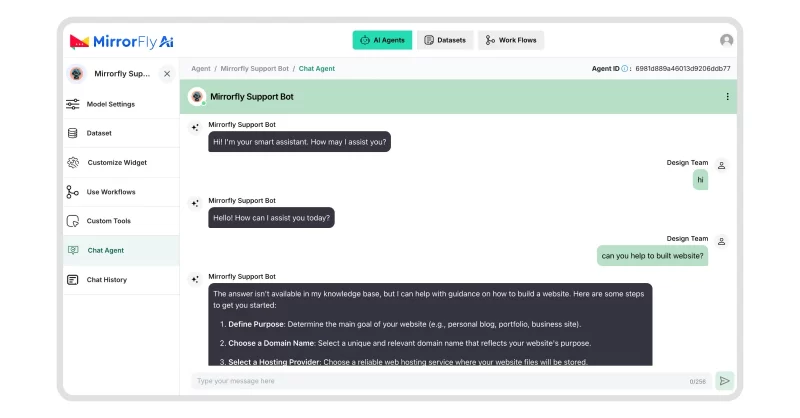
- Choose where to deploy: on-premise, MirrorFly cloud, or hybrid.
- Test your chatbot:
- Functional testing (features work as expected)
- Performance testing (handles expected user load)
- Security testing (data safety)
- Conversational quality testing (answers make sense)
- Set up production architecture:
- Load balancing
- Auto-scaling
- Redundancy and backups
- Use containers (Docker, Kubernetes) for flexible and scalable deployment.
Common Pitfalls & Best Practices
The general disadvantages of developing and launching an LLM chatbot can be explained into 2 main categories:
- Technical Pitfalls
- Ethical and Misuse Pitfalls
1. Technical Pitfalls
🔹 Hallucination
Your LLM chatbots may respond to user queries with incorrect or non-factual information. They may cite answers from unreliable/ fictional publications or cite the sources incorrectly.
- Solution: Implementing RAG can help your chatbot connect to external and factual knowledge sources and deliver responses.
🔹Knowledge Recency
Sometimes, your chatbot may not be able to give responses beyond their last trained data. Moreover, updating LLMs is quite expensive and failing to update might lead to catastrophic forgetting.
- Solution: Incorporating RAG helps keep your general and vector databases up-to-date.
🔹Logical Reasoning
At times, chatbots struggle in conversations involving multi-step reasoning. Their thinking process is not as rational as humans.
- Solution: Use advanced prompt engineering techniques like CoT and ReAct to handle multi-reasoning steps.
🔹Managing Conversation History
Your chatbot system may overflow at one point with an overwhelming number of messages. It may exceed the LLM’s context window.
- Solution: Add an intermediate step in the workflow to limit the size of messages. Configure the maximum number of messages or tokens that must be saved in the history logs.
🔹Computational Costs
If your LLM’s size is massive over a billion parameters, it takes huge expenses to store, distribute or deploy the data.
- Solution: Go with model compression and optimization techniques like distillation, pruning and quantization.
🔹Ambiguities
Your chatbots may struggle to empathize with your customers in the right sense, since the user queries in the text format may lack emotions and reveals no body language.
- Solution: Explore opportunities in prompt engineering, and auto-recommend queries and styles.
2. Ethical and Misuse Pitfalls
🔹Transparency and Blackbox nature
In general, LLMs are considered as black-box models. This means, it is quite difficult to understand the reasoning behind the answers. Plus, some chatbots are not transparent about how they come to a conclusion or perspective about an answer.
- Solution: Build RAG chatbots that explain its thinking process when preparing the answer. So users can interfere and correct the thinking if the bot is in a different direction than the expectation. There is so much room of improvement when it comes to privacy and security. Developers must tap into it.
🔹Bias and Unfairness
When you train your chatbot with limited data, the bot may pick up inherent biases by processing only the perspectives around the trained information. There are risks of the chatbot delivering answers that unintentionally stereotype or discriminate.
- Solution: Monitor your chatbot after every training and fix biases right away.
🔹Privacy Risks
Your LLMs are trained with large datasets. As the chatbots converse with a user, it may pick up sensitive information like the chat logs with the bot and user’s personal details like login credentials. If the chatbot is insecure, it may accidentally reveal the information to others.
- Solution: Implement encryption, data anonymization and controlled data access.
🔹Misuse (Infodemic)
Your chatbots may casually deliver wrong answers as if it were true and authentic.
- Solution: Make sure your validate responses, automate them with pre-written responses, if necessary.
Common User Queries
1. How can a custom LLM chatbot support multi-user conversations and memory?
An LLM alone cannot remember past conversations. For each user, you’ll need to add a separate conversation memory by assigning a session ID. So every time the user converses with the chatbot, it labels the chat with the session ID assigned to the user.
Next time, when the user sends out a message, the system looks up your database, fetches the ID and retrieves all the conversations associated with that ID.
2. Why does a custom LLM chatbot fail to retain context or follow-up questions?
In general, a custom LLM chatbot is not capable of retaining the conversation data. It can remember the conversation only when you send out a new request along with the past conversation. But to enable the custom LLM chatbot to retain context, you’ll need an external memory layer.
Alternatively, building a chatbot with LLM-based chatbot solutions like MirrorFly handles it all for you. It syncs and stores data consistently, without you needing to build complex systems all by yourself.
3. How do you ensure a custom LLM chatbot returns accurate answers from your data?
A regular LLM chatbot can rely only on the training data. It cannot think beyond it and might hallucinate if the user query goes beyond its scope. This is where you’ll need Retrieval-Augmented Generation (RAG). RAG enables you to add your own datasets and sync your website. These RAG-enabled chatbots can fetch relevant data from these data sources and answer customer queries accurately, hallucinating less.
4. What types of data can be used to train a custom LLM chatbot?
Most custom LLM chatbots with RAG support datasets in TXT, PDF, JSON, and CSV files. Besides this, you can also add FAQs and custom guardrails.
5. Can a custom LLM chatbot support multiple languages and local languages?
Yes, a custom chatbot can support multiple languages and local languages. Most LLMs support hundreds of languages.
Since you can customize these agents, you can fine-tune the accents and dialects so your users experience a more personalized and localized chat with your chatbots.
What Next?
If you are here, this means you’re truly committed to building a chatbot app for your business. It is easier with MirrorFly. But, it gets even easier when you take help from experts. Discuss your requirements, derive out a plan, get a quote and start with your AI Chatbot development right away.
Want more details? – Click here to get started!
Ready To Add a Secure White-Label AI Chatbot to Your Product Stack?
Design and deploy a secure LLM AI chatbot tailored to your business workflows, user experience, and enterprise infrastructure.
Contact Sales Context-Aware Responses
-
RAG Control
-
Deployment Ready
 Context-Aware Responses
 Atchaya Jayabal is a passionate content writer specializing in SaaS, B2B and Technical Writing. She is best known for her adept expertise in curating tech content that resonates with readers.