


I tested dozens of workplace communication software, from team chat apps to AI Assistants, and these are the 10 best software for 2026 that consistently help employees, clients, partners and stakeholders daily.
The 11 Best workplace communication software: At A Glance
Here’s a quick look at all 10 platforms I’ll be covering and what each one promises:
| Software | Best For | Price |
|---|---|---|
| 1. MirrorFly | Custom enterprise communication | Custom pricing |
| 2. Zoom | Hybrid and remote teams | $13.33 per user/month |
| 3. Troop Messenger | Enterprise communication software | Custom pricing |
| 3. Apphitect | Enterprises seeking self-hosted CPaaS | Custom pricing |
| 4. Microsoft | Real-time collaboration | Free version |
| 5. Pumble | SMB, startups & remote teams | $2.49 per user/month |
| 6. RingCentral | Enterprise telephony & UCaaS | $20 per user/month |
| 7. Flock | Cloud-based UCaaS | $0.054 USD |
| 8. Nextiva | Consolidated video, voice and chat | $15 per user/month |
| 9. Connecteam | Deskless, frontline, and remote teams | $29 per month |
| 10. HubEngage | AI-powered, multi-channel communication | $1.00 per user per year |
Next, let’s explore these tools in detail.
1. MirrorFly: Best for building custom communication into workplace apps
What It does: MirrorFly is an AI-powered CPaaS solution you can use to build your own custom chat app for sending and receiving messages across teams.
Who it’s for: Enterprise tech teams, SaaS companies, and any business teams who want to build a fully custom instant messaging app for daily work communication.
When I first tested MirrorFly, I approached it the same way I would approach a regular chat app. MirrorFly is not an off-the-shelf product that you can download from App stores and install on your computer. It’s a custom CPaaS solution that provides APIs and SDKs for adding real-time communication to apps. One of its products is team collaboration software, which enables secure communication and collaboration among internal teams.
The biggest difference compared with most workplace communication software is the customization. Instead of restricting teams with rigid features, I could use MirrorFly to add messaging features for my workflow. It helped me build my own chat app without me jumping between multiple third-party communication apps.
Overall, MirrorFly is an interesting option for businesses exploring alternatives to apps like Microsoft Teams, or Slack without wanting to simply replace one fixed platform with another.
Key Features
- 1-on-1 and group chats: You can send out messages to another team member directly or send to a group of people.
- Large File sharing: MirrorFly supports sharing huge-sized files easily without any limitations.
- Presence Indicators: MirrorFly can display when a user is online in your chat app. It can set different presence status like Online, Away and Ideal.
- AI-driven chatbots: You can use MirrorFly’s AI agent dashboard and chatflow builder to create custom chatbot for your business.
Pros
- Customize any part of MirrorFly chat solution
- Supports white-labeling with full source code access
- Flexibility to host anywhere Self-hosted (SaaP) or cloud-hosted (SaaS)
- Customize security features beyond pre-built E2E features
Cons
- Agenda creation in real-time is still in Beta
Bottomline
Most workplace communication software helps you connect teams. MirrorFly goes a step further and handles everything for you. If you want AI-powered chat that manages all communication, MirrorFly stands out as the most powerful chat software on this list.
2. Zoom Workplace: Best for video-first hybrid teams
What it does: Zoom combines video calling, chat and voice calling into one workspace where you can handle all communication, manage projects and collaborate with your team.
Who it’s for: Remote-first and hybrid organizations that want a single app for all their business communication, task planning and management.
I started using Zoom as a simple video-calling app, but it quickly turned into a platform where all my work communication happens. I created channels for each project, added members, and created tasks for each one of them. Every communication happened in one place.
What makes Zoom workspace stand out is its extensive features. You can enjoy a full-range of features on this workplace communication platform, or add custom integrations like Hubspot or Zapier to keep all parts of your work in sync. For example, I connected my Google calendar to my chat app. Whenever I instruct my team for a follow-up, I schedule a meeting directly on our calendars.
Key Features
- Team chat: Teams can create channels for each project or department, and use instant messaging to communicate with each other.
- HD video meetings: Create breakout rooms, record video calls, and transcribe video calls in real-time.
- AI Companion 3.0: Zoom provides AI-powered features like meeting summaries, action items, and document drafting.
- Zoom Phone: Replace all your traditional PBX to cloud-based VoIP.
- Whiteboards and Zoom Docs: for collaborative content creation
Pros
- Wide range of chat and video meeting features
- High-quality video calling across network conditions
- Consistent experience across desktop, mobile, and web
Cons
- Requires additional resources to run on old hardware
- Add-on pricing for phone, webinars, and large rooms
3. Troop Messenger: Best for secure team communication
What it does: Troop Messenger is a business messaging app that combines one-to-one and group chat, audio/video calling, and productivity tools like screen sharing and a joint code editor, all built around strict data control and security.
Who it’s for: Teams and organizations including government, defense, and other security-conscious sectors that want a lightweight, secure alternative to bulkier collaboration suites, with the option to self-host.
Key Features
- One-to-one and group messaging: Includes instant messaging, voice messages, and “Burnout” a self-destructing chat window for confidential conversations.
- Audio and video calling: High-quality 1:1 and group calls, with a one-click “Join Now” option for jumping into ongoing calls.
- Forkout bulk messaging: Send messages and attachments to a large number of users or groups in a single action.
- Screen sharing and code collaboration: Remote screen sharing plus a joint code editor with code-snippet support for dev teams.
- Security controls: End-to-end encryption, multi-factor authentication, LDAP/SSO, role-based access, and audit logs.
Pros
- Flexible deployment: available as SaaS, on-premise, via chat API, or custom deployment
- Strong security posture, popular with government and defense-sector teams
- Simple, intuitive UI compared to heavier platforms
Cons
- Smaller third-party integration ecosystem than platforms like Microsoft Teams
- Not a full work-management hub lacks deep task/project tracking, so teams often still need separate tools
- Some enterprise features (e.g., screen sharing, unlimited video conferencing, SSO) are locked behind the higher-tier Enterprise plan
4. ApphiTect: Best for enterprise messaging
What it does: Apphitect helps you add chat features, customize them and deploy them in your own business chat app.
Who it’s for: Individuals and teams who want a pre-built solution to build AI-powered chat apps for business communication.
I tested several enterprise communication platforms for workplaces while researching this article, including more complex tools like Slack and Microsoft Teams. I liked Apphitect because it supports me in building my own team chat app. Adding features to existing apps takes just a few minutes, and the setup feels simple.
What stood out during testing was how easy it felt to integrate the SDK. I could quickly build my own white-label AI chatbots with custom guardrails and AI voice agents for a more immersive conversational experience.
Key Features
- Real-time one-to-one and group messaging: Send and receive chat messages individually or between teams.
- Voice and video calling: Collaborate with multiple departments or stakeholders over high-quality voice and voice calling
- Multimedia sharing: Share files, photos, videos and documents of any size or format across teams.
- Third-party service integrations: Apphitect supports hundreds of third-party integrations that you use everyday at work.
- AI chat agents: Apphitect provides AI solutions to build conversational AI agents for communicating with teams, and customers.
Pros
- Self-hosted and cloud deployment: Deploy team chat on any server you prefer – on your cloud, datacenter or on-premise chat server.
- White-labeling: Add your company logo, colors and brand elements to your chat app
- Custom security: Modify any part of the security encryptions or compliances as per your business needs
Cons
- Does not offer a free trial. But interested businesses can contact their sales team to get a custom quote.
5. Microsoft Teams: Best for work collaboration
What it does: Microsoft Teams helps you chat with team members, schedule meetings, and manage tasks across multiple teams and departments.
Who it’s for: Individuals and teams who need a secure messaging app to manage all their work communication in one place.
I use Microsoft Teams daily to chat with my clients across the globe. During testing, I focused on how securely I can send messages to our stakeholders in different regions of the world. MS Teams supports messaging features without disturbing the workflow.
The biggest advantage is how well it connects with the third-party tools and plugins we use every day. I was particularly impressed how MS integrated its Office 365 products into Teams. When my co-author and I were discussing this review in Teams, I could easily move to the Word Document right from Teams without any friction.
Key Features
- Chat channels: Multiple people can reply to one specific message.
- Microsoft 365 integration: Teams can connect with multiple MS products like Sharepoint, MS Office and MS Onedrive
- Breakout rooms: Create sub-meetings within the same meeting for a smaller group of participants.
- Copilot AI: Automate daily tasks by providing contextual assistance and data analysis
- Enterprise security: Secures chat conversations with role-based access, and audit trails
Pros
- Integrates with MS products
- Free for organizations already paying for Microsoft 365
- Secure and compliant with industry standards
Cons
- The UX is dense and new users may find the app difficult to use
- Too many alerts and notifications
- File management can be confusing
6. Pumble: Best for budget-conscious teams
What it does: Pumble offers an all-in-one communication platform to chat with teams and customers in a simple and smooth UI
Who it’s for: Teams and individuals that feel Slack is costlier and needs a feature-rich, budget-friendly option.
When I started testing Pumble, it felt more like working on Slack. It had most of Slack’s features and the experience had only subtle differences. It just was less costlier than Slack and offers unlimited message history and unlimited users on its free plan.
If you’ve ever used Slack, hit the 90-day message archive limit and lost all your important projects, you’ll understand how valuable and budget-friendly Pumble is.
The interface is simple and familiar for Slack and MS Teams users. You’ll find the direct messaging, file sharing, mentions, threads and message pinning features as you’ve used already on other platforms.
Key Features
- Public and private channels: Teams can create their own channels with customizable names and descriptions
- Scheduled messages: Send messages exactly when you want to. Schedule them prior for async communication across regions
- Cross-platform: Chat from any device, any platform – web, iOS, or Android
Pros
- Unlimited message history on the free plan
- Familiar, Slack-like interface that’s easy to learn
Cons
- Limited native integrations – relies on Zapier
- No built-in AI or advanced automation
- Video features lag behind dedicated tools
7. RingCentral: Best for UCaaS & Contact Centers
What it does: Simplifies outbound chat and calls with an easy-to-use communication platform.
Who it’s for: Mid to large-sized enterprises that depends on telephony as a critical business function.
If your business takes telephony seriously, you might have to consider RingCentral. This unified workplace internal communication platform has been in the market for a while. It has a large set of features, and a reliable call infrastructure.
If your team involves outbound chat and calls, RingSense AI has you covered. The AI helps managers analyze post-conversation summaries and insights to improve agent performance consistently.
Key Features
- Team Messaging: Send and receive messages across teams. Set separate team channels and keep conversations organized.
- Video conferencing: Launch video meets for multiple participants on the same app.
- Cloud-based VoIP: Replace your traditional telephony system with cloud-based VoIP calling
- RingSense AI: Transcribe calls, and coach your agents with advanced call insights
- Native integrations: Integrate chat system with Salesforce, Microsoft Teams, Google Workspace, or HubSpot
Pros
- Powerful calling and call management for teams
- Connects easily with tools like Salesforce
- RingSense AI helps improve calls and team performance
Cons
- Costs can rise quickly as you scale
- Setup can be complex
- Customer support quality is not consistent
8. Flock: Best for SMBs
What it does: Flock offers chat, video conferencing and file sharing features to streamline workplace communication.
Who it’s for: Small to medium scale businesses that need a budget-friendly Slack alternative.
Flock is a workplace communications platform that offers more than essential messaging features. It comes with notes, polls and reminders making it a full-stack tool for workplace communication and collaboration.
When I tested Flock, I was able to create a shared to-do list with a colleague right from a chat conversation, without leaving the app. We also noticed the code snippet sharing options that most apps we tested did not have. However, I felt Flock depends a lot on Zapier for advanced third-party automation.
Key Features
- Built-in productivity tools: Beyond messaging, use tools to create to-do lists, notes and task reminders for your teams
- Code snippet sharing: Share blocks of codes easily with your developer teams in just few clicks
- Flock App Store: Extend the capabilities of your platform by connecting with third-party tools
- Magic search: Search messages with automatic contact and channel surfacing
Pros
- Built-in tools like tasks, polls, and notes
- Very affordable for the features offered
- Fast, clean, and easy-to-use messaging
Cons
- Video quality can be inconsistent
- Desktop app takes time to learn
- Limited native integrations without Zapier
Bottomline
Most teams use Flock Chat for replacing their internal email workflows with team chat communication. The platform is easy to use even for non-technical users and is affordable.
9. Nextiva: Best for growing businesses
What it does: Nextiva is an AI-powered unified customer experience management (CXM) platform that consolidates all customer interactions under one roof.
Who it’s for: Teams that are focusing on consolidating their phone system, video conferencing and team messaging.
I confidently recommend Nextiva to mid-sized businesses for its simplicity. This does not mean Nextiva compromises on features. It offers an extensive set of capabilities like voice calling, video meetings, team chat and webinar hosting. You’ll not need separate subscriptions for chat and video calling.
The call management capabilities stood out during testing. When I started the chat with a chatbot and needed human support, the transfer happened quickly. This is notably a good sign without making customers wait longer and answer questions on loop.
Key Features
- NextivaONE: Use chat, voice, video, SMS, and fax features in the same app
- AI-powered call routing: Transfers or connect calls to the right agents or departments with AI
- Voicemail transcription: Converts spoken words in voicemails into texts
- Interaction summaries: Generates short consolidated notes on the interactions that happen between users
- Webinar hosting: Organize and host webinars for internal and external users
Pros
- Ease of use
- The cost of 24/7 support is high
- Scales easily from small teams to large enterprises
Cons
- Clear, high-quality voice and video calls
- SMS/MMS setup can be slow
- May face issues during heavy usage
10. Connecteam: Best employee chat app
What it does: It connects deskless workers across construction, retail and home services with features optimized for quick interactions on small screens.
Who it’s for: Individuals and teams that spend their days away from a computer but still need to stay connected, and coordinated.
When I evaluated Connecteam, I specifically had the deskless workforce in mind. The platform has options to schedule staff shifts, prepares task checklists, and tracks time with GPS. There were also other features like onboarding and training modules, everything in the same app.
The one drawback our team found with Connectteam is that it did not have a built-in voice or video calling. You need to pair an external video tool like Zoom to incorporate video meetings on the app.
Key Features
- Mobile-first team chat: Connect frontline workers via mobile chat easily
- Company-wide announcements: Send out updates and alerts to team members based on targeted roles or locations.
- Employee time clock: Monitor how long an employee had worked for the day with GPS verification
- Task management: Use checklists, and forms within the chat workflows
Pros
- Combines chat, and productivity tools in one app
- Easy to use
- Does not require much training
Cons
- No built-in voice or video calling
- Limited reporting and analytics
- Too many features for small teams
11. HubEngage: Best for employee engagement
What it does: Hubengage turns everyday work conversations into a more structured communication making task management and data management easier.
Who it’s for: Teams like HR, internal communications, and people operations, especially those with distributed, hybrid, or frontline workforces.
When I tested HubEngage, the biggest difference compared with other work apps was how it intersects internal employee communication, and workforce engagement.
I was particularly impressed with HubEngage’s auto-formatting capability. The content is automatically adapted to each channel, so you don’t have to manually reformat a newsletter announcement for SMS or a mobile push notification.
HubEngage’s AI capabilities have widened when compared to the last 3 years. Their AI-powered content generation helps teams draft announcements and updates automatically.
Key Features
- Multi-channel reach: Connect teams across any channel – mobile app, web, email or WhatsApp
- Employee recognition: Make conversations more engaging with badges, points, leaderboards, and gift card rewards
- AI content generation: Automatically generate chat reply suggestions using sentiment analysis
- Pulse surveys: Use AI-driven insights by gathering feedback from multiple users to improve product/ service
- Real-time analytics: Get updates on the engagement trends on your app
Pros
- Chat with users across multiple channels
- Gamified features make conversations more engaging
- AI analytics help track user activity and usage
Cons
- New features may not be rolled out consistently
- Most times, you’ll need manual steps for video workflows
- For advanced features, you’ll need to pay extra
How I Tested These Workplace Communication Software
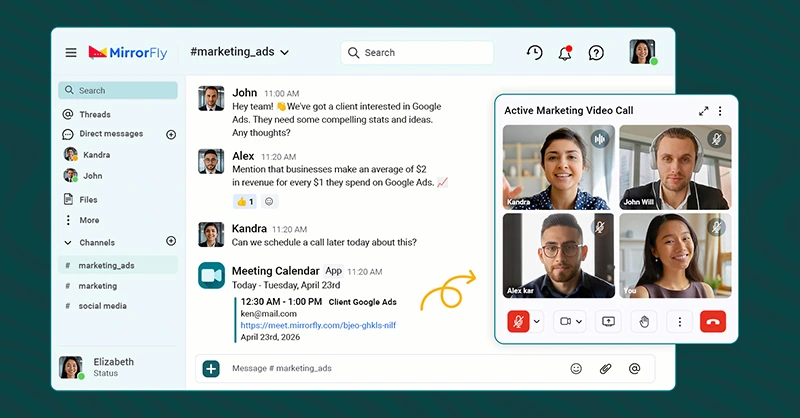
I tested these workplace communication software across common workflows like everyday team chat, internal meetings, group communication, and coordinating with teammates to see where each of them actually fits in everyday office operations.
I also reviewed G2 ratings, Trustpilot reviews, SoftwareSuggest reviews, official websites, pricing pages and documentation to understand how people use these tools in their workplaces. That helped identify the specific details of these software instead of the common information available on the internet.
I avoided reviewing tools that had chat as one of their features but was primarily built for a different purpose. A task management app should not compete with instant messaging platforms built for teams, and a personal chat app should not be judged like a work communication software. Here’s what I looked for:
- Customization: I looked at how flexibly a team can customize the software to add chat features as per their daily requirements. Tools that had rigid configuration ranked lower than the software that are customizable in every part.
- Data Control: Many software providers in the past were deranked for accessing office data. This is a threat to organizations. I focused on tools that let the organization have all control of the data.
- Workflow compatibility: Most software have a pre-built workflow. I evaluated how much each provider allowed organizations to use their codebase.
- White-labeling: Some tools have their own colors, themes and elements. Teams cannot change them. I looked at how well each of these communication solutions supports branding the app with the company’s elements, instead of restricting them.
- Self-hosting: Most platforms run on their own servers. This is inconvenient for enterprises that want to keep data within their premises. I looked at how each provider supported hosting and whether they allowed on-premise deployment.
Final Thoughts
If I had to choose one chat software for workplace communication, I would pick MirrorFly or Apphitect because it’s a solution you can fully customize, with thousands of pre-built features. My work usually involves coordinating with teams, and collaborating with offshore stakeholders, and our business app running on top of MirrorFly handles all of it with ease.
- However, MirrorFly may not be the right fit for everyone. If you only want an app to chat, Microsoft Teams or Nextiva offer simpler systems that focus entirely on messaging features.
- If your main challenge is to set video meetings, Zoom Workplace or ConnectTeam make more sense. They help launch meetings and connect staff, clients or partners in a way that’s easy and flexible.
- For replacing email communication with instant messaging features, Flock and Pumble work well. They help chat, make video calls and share files with each other, every day.
- Personally, I prefer tools that really connect people through chat at work without compromising on flexibility and security.
Instead of using 3 separate chat apps to send messages, plan work and coordinate with people, I would rather use a solution that does all of them on the go. That is where MirrorFly fits best into my workflow.
 Atchaya Jayabal leads Content at MirrorFly and is an expert in writing Tech, SaaS & B2B. She regularly publishes articles on CPaaS & Conversational AI in blogs.
I’m really curious about the self-hosted chat solutions mentioned here. For companies with strict data privacy requirements, having full control over their communication infrastructure seems like a huge advantage. I wonder how these solutions compare in terms of integration with existing enterprise software.