


In 2026, sending text or voice messages to friends or family through WhatsApp happens instantly. However, many systems work in the backend. It includes authenticating users, routing messages, encrypting conversations, and delivering push notifications in chat apps.
Developers and business owners who build WhatsApp clone apps also deal with these systems. While building the chat apps, they face many challenges.
The most common ones include message delivery guarantee, scalable WebSocket connections, customizable workflows, and on-time app launch.
That said, we will guide you on how to create an app like WhatsApp in this article. It covers:
- What features to prioritize at the initial stage
- The architecture behind a WhatsApp clone app
- Tech stack required to build the entire platform
- Building from scratch vs an SDK solution
- How to build a chat app like WhatsApp
Now, before diving into the guide, let’s answer the basic question.
Why Build a WhatsApp Clone Instead of Using ‘WhatsApp Business’?
Small to medium businesses rely on the WhatsApp Business API platform. It offers direct communication, supports AI agents, and third-party integration. But enterprises that build their own messaging app for web and mobile have these advantages:
| WhatsApp Business API | Developing WhatsApp Clone App |
|---|---|
| ❌ Vendor-lock-in | ✅ Full Branding Control |
| ❌ No Customization | ✅ Unlimited Customization |
| ❌ Cloud-hosted Platform | ✅ Self-hosted Chat Server |
| ❌ No Source Code Access | ✅ Full Source Code Access |
| ❌ Limited Data Ownership | ✅ Your Data, Your Control |
Now, the benefits of building your own custom WhatsApp-like app are clear. Let’s dive into the features.
What Essential Features To Include in a WhatsApp Clone Platform
Dozens of features can be added to chat apps to enhance functionality and improve user interaction. We listed only the top instant messaging features in this section under four categories:
1. Messaging & Interaction Features
This set of features allows chat app users to message and interact in real-time, no matter how far they are located.
- Private & Group Chat: Allows users to communicate 1-on-1 and in group conversations.
- Read Receipts: Shows message status as ‘sending ‘, ‘ sent ‘, ‘ delivered, ‘, and seen’.
- Media & File Sharing: Users exchange images, videos, GIFs, audio, and docs.
- Message Reactions: Allows users to interact with messages using emojis.
- Message Actions: Users can reply, forward, edit, and delete messages for all.
- Search Messages: Allows searching for a chat using keywords, file names, or contacts.
- Archive Chats: Hide conversations or stop notifications from busy groups without deleting.
- Contact Sync: Enables instant chat with already registered phone contacts by syncing.
2. Calling Features
These in-app voice calling and video conferencing features allow users to communicate with their loved ones instantly.
- Real-Time Voice Calls: Enables one-to-one and group voice conversations.
- Video Conferencing: Allows users to have secure video calling with family/teams.
- Screen Sharing: Users can share their device screen during video calls.
3. Security Features
Secure messaging is important to protect user conversations from hackers. This prevents data mishandling and misuse.
- End-to-End Encryption: Encrypts messages so only the sender and recipient can read.
- Role-based access control: Users are grouped as admins and moderators in the chat room.
- Email Login & SSO: Only authorized users log in with their email ID to improve security.
4. Advanced Features
These features enable users to communicate smartly, save their time, and improve their overall experience with the app.
- AI Chatbot Integration: Allows users to summarize missed chats and automate tasks.
- User Profile Customization: Users can personalize their profile to enhance experience.
- Cloud Sync: Keeps conversations synchronized across multiple devices in real time.
The above features are non-negotiable at chat app launch. As the user base in the platform grows, other nice-to-have features can be added.
How A WhatsApp Clone App Works: The Architecture
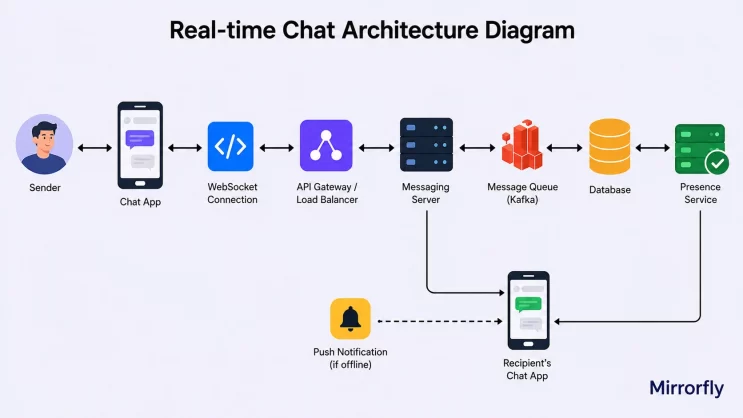
Developers should understand the architecture to choose the right technologies and avoid unwanted expenses during the development process.
Chat App Architecture:
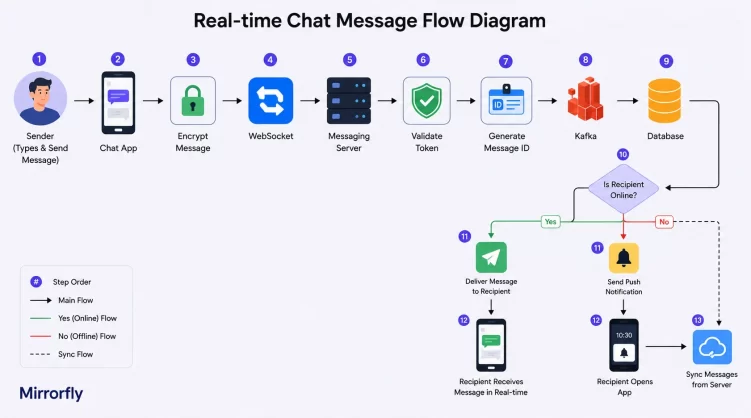
Message Flow:
Note:
Text messages, media uploads, and voice/video calls follow different communication protocols for real-time apps. Text messaging relies on persistent WebSocket connections. Media files are uploaded to object storage. Voice/video calling relies on WebRTC with a signaling server.
1. Chat Application
Initially, a user sends messages or uploads images or makes a WhatsApp call from his Android/ iOS/ web platforms. The app maintains a persistent WebSocket connection with the messaging server to receive real-time communication updates.
2. Authentication
When a user logs in, the authentication service verifies his identity and provides a secure access token. The API Gateway or Messaging Server validates this token before processing the chat app’s requests.
3. API Gateway
This entry point routes requests to the right backend services. It handles access token validation, rate limiting, request validation, and logging. The token validation at this layer happens on the HTTP upgrade request, before the WebSocket connection.
4. Real-Time Messaging Server
Here, persistent WebSocket connections with the user are established. Whenever the user sends a message, the server processes the request, identifies the recipient, and delivers the message without waiting for another HTTP request.
Note:
WhatsApp uses a custom XMPP-based protocol for its chat connections. However, WebSocket is also a widely used choice for clone apps. Know the difference between XMPP and WebSocket to decide the best one for your chat app development.
Token validation at this layer happens per-message or per-session. This confirms the connection remains authorized after the initial handshake.
The messaging server manages typing indicators, online presence, read receipts, delivery acknowledgments, and message synchronization.
5. Messaging Workflow
The outgoing message follows a sequence when reaching the recipient. This sequence ensures messages remain reliable even under an unstable network.
- Encrypt the message
- Validate the sender
- Generate a unique message ID
- Publish the event to Kafka
- Persist the message in database
- Deliver it to recipient
- Update delivery and read status
- Retry delivery (if the recipient is offline)
6. Database & Media Storage
The database stores user profiles, messages, groups, contacts, and metadata. As the user base grows, databases often use replication and sharing to distribute data across multiple nodes and improve scalability.
Chat platforms continuously generate large data volumes. So developers should optimize indexing, partitioning, and query performance from the beginning.
Images, videos, voice notes, and documents are uploaded to dedicated object storage instead of the messaging database. The server stores only metadata and file URLs while the actual media resides in cloud storage.
7. Presence & Synchronization
This layer continuously tracks user availability including online status, typing indicators, last seen timestamps, and active devices.
It synchronizes unread messages, conversation history, and message status across multiple devices to ensure consistent user experience.
8. Push Notification
When the recipient is offline, the messaging server forwards notification requests to Firebase Cloud Messaging or Apple Push Notification Service. Once the user connects, the unread messages are synchronized from the backend.
9. End-to-End Encryption
Before the message leaves the sender’s device, it is encrypted using encryption keys. The messaging server routes encrypted data without accessing its contents. This architecture ensures user conversations remain private.
10. Scaling The Architecture
As the user base grows, a single messaging server is not sufficient. A production-ready messaging solution distributes traffic across multiple app servers using load balancers.
Technologies such as Redis support caching and session management. The message brokers such as Kafka / RabbitMQ process events asynchronously.
What Tech Stack is Recommended for Developing a WhatsApp Clone App?
The tech stack you choose is important when creating a chat app. It influences server connection status, message syncing, and database scalability. The wrong choice would lead to server crashes, data loss, and slow down the chat experience.
We listed our recommended frontend and backend technology in this section. This will help you build a stable instant messaging app.
1. Frontend Technology:
The frontend decides ‘how long a message takes to appear’ and ‘whether features work smoothly’. So developers should balance speed along with the codebase.
| Component | Web | Android (Mobile) | iOS (Mobile) |
|---|---|---|---|
| Programming Language | JavaScript/TypeScript | Kotlin | Swift |
| UI Framework | React.js, Next.js | Jetpack Compose (or XML) | SwiftUI (or UIKit) |
| Real-time Messaging | WebSocket, Socket.IO | WebSocket, Socket.IO | WebSocket, Socket.IO |
| Push Notifications | Firebase Cloud Messaging | Firebase Cloud Messaging | Apple Push Notification |
| Media Capture | MediaDevices API | CameraX, MediaRecorder | AVFoundation |
| File Uploads | Fetch API, Axios | OkHttp, Retrofit | URLSession, Alamofire |
| Local Storage | IndexedDB, LocalStorage | Room Database, DataStore | Core Data, UserDefaults |
2. Backend Technology:
The right backend supports thousands of concurrent user connections without consuming excessive CPU or memory. We suggest the following technologies:
| Component | Web & Mobile |
|---|---|
| Programming Language | Java, Node.js (TypeScript), Python |
| Backend Framework | Spring Boot, NestJS, Express.js, FastAPI |
| Cloud Infrastructure | AWS, Google Cloud Platform (GCP), Microsoft Azure |
| Load Balancer / API Gateway | NGINX, Kong, HAProxy, AWS Load Balancer |
| Real-Time Messaging | WebSocket, Socket.IO, XMPP |
| Message Queue | Apache Kafka, RabbitMQ |
| Database | PostgreSQL, MongoDB, Cassandra |
| Cache | Redis |
| Operating System | Ubuntu Server, Debian, Red Hat Enterprise Linux |
| User Authentication | OAuth 2.0, JWT, OpenID Connect, Firebase Authentication |
| Security | TLS/SSL, End-to-End Encryption, AES, HTTPS |
| Media Storage | Amazon S3, Google Cloud Storage, Azure Blob Storage |
| Media Processing | FFmpeg |
| Group Chats | WebSocket + Redis + Kafka/RabbitMQ |
| Voice & Video Calling | WebRTC, STUN, TURN, SFU |
| Content Delivery Network | CloudFront, Cloudflare CDN, Google Cloud CDN |
| Monitoring & Logging | Prometheus, Grafana, ELK Stack, OpenTelemetry |
| Containerization | Docker |
| Container Orchestration | Kubernetes |
Building WhatsApp Clone from Scratch vs SDK Solution
When you build a WhatsApp-like chat app from scratch, you have maximum control and customization options. However, it’s time consuming, needs a huge investment, and demands experts to troubleshoot issues.
WhatsApp Clone Cost & Timeline Comparison
| Common Factors | Building from Scratch | Self-hosted SDK solution |
|---|---|---|
| Cost Estimation | $25k to $500k (approx.) | One-time license fee (custom pricing) |
| Approx. Time for Deployment & Launch | 6 to 12 months depending on the complexities | 48 hours |
| Common Challenges | Fix downtime, ensure instant message delivery, optimise database performance, protect from DDOS attacks. | Integrating complex or AI features can delay the expected launch time. |
| Best for | Enterprises that need full customization, white-labelling, full source code access, and flexible hosting of the chat app. | Businesses that have a long development timeline. |
When you choose a self-hosted chat solution to build a WhatsApp clone platform, the provider handles the complexities. And it offers you full freedom to integrate custom chat, voice, and video features into your Android, iOS, and web apps.
That said, we can dive into the implementation step.
How To Build a WhatsApp Clone with MirrorFly Solution
We have explained the entire process in this section under five steps.
- Step 1: Initial Setup
- Step 2: Add My Application
- Step 3: Register user
- Step 4: Connect to chat server
- Step 5: Send/ receive messages
Let’s start.
Step 1: Initial Setup
In this first step, you will add the dependencies and get the license key.
Here are the requirements for the chat SDK for Android. (IOS and Web)
- Android Lollipop 5.0 (API Level 21) or above
- Java 7 or higher
- Gradle 4.1.0 or higher
- targetSdkVersion,compileSdk 34 or above
Note:
If you’re utilizing Chat SDK version 7.11.4 or higher, adjust the target SDK version to 34. This is due to the migration of Chat SDK to Android 14.
Now, get the MirrorFly License Key.
For this, you have to register for a MirrorFly User Account.
Contact the MirrorFly Team to set up an account and log in.
Navigate to the ‘Application Info’ section, and you’ll find the license key. This is required for authenticating the SDK in your application.
1: Create a new project / open an existing one in Android Studio.
2: If you’re using Gradle 6.8 or higher, then add this code to your settings.gradle file.
For Gradle 6.7 or lower, add it to your root build.gradle file. Check the release notes for more details on Gradle updates.
Gradle 6.8 or higher
Gradle 6.7 or lower
dependencyResolutionManagement {
   repositories {
       mavenCentral()
       google()
       jcenter()
       maven {
           url "https://repo.mirrorfly.com/release"
       }
   }
}
3: Add these dependencies to your app/build.gradle file.
dependencies {
  implementation 'com.mirrorfly.sdk:mirrorflysdk:7.13.7'
}
4: Now, add the following line to the gradle.properties file to prevent conflicts with imported libraries.
android.enableJetifier=true5: Open the AndroidManifest.xml file and add the following permissions.
<uses-permission android:name="android.permission.INTERNET" />Now, initialize Chat SDK
To start using the SDK, ensure you meet the basic requirements before beginning the initialization process.
In your Application class, within the onCreate() method, call the following method from ChatManager to provide the necessary data.
ChatManager.initializeSDK("LICENSE_KEY", (isSuccess, throwable, data) -> {

           if(isSuccess){
               Log.d("TAG", "initializeSDK success ");
           }else {
               Log.d("TAG", "initializeSDK failed with reason "+data.get("message"));
           }
       });
Step 2: Add MyApplication
Add the MyApplication class to your AndroidManifest.xml file.
<?xml version="1.0" encoding="utf-8"?>

<manifest xmlns:android="http://schemas.android.com/apk/res/android"

   package="com.example.uikitapplication">

<application

       android:name=".MyApplication"  // Add this line.

       android:icon="@mipmap/ic_launcher"

       android:label="@string/app_name"

       android:roundIcon="@mipmap/ic_launcher_round"

       android:theme="@style/AppTheme">

       <activity android:name=".MainActivity">

           <intent-filter>

               <action android:name="android.intent.action.MAIN" />

               ...

               <category android:name="android.intent.category.LAUNCHER" />

           </intent-filter>

       </activity>

   </application>
Step 3: Register User
Use the following method to register a user in Sandbox or Live mode, depending on the setIsTrialLicenceKey setting.
FlyCore.registerUser(USER_IDENTIFIER, (isSuccess, throwable, data ) -> {

       if(isSuccess) {

           Boolean isNewUser = (Boolean) data.get("is_new_user"); // true - if the current user is different from the previous session's logged-in user, false - if the same user is logging in again

           String userJid = (String) data.get("userJid"); //Ex. 12345678@xmpp-preprod-sandbox.mirrorfly.com (USER_IDENTIFIER+@+domain of the chat server)

           JSONObject responseObject = (JSONObject) data.get("data");

           String username = responseObject.getString("username");

       } else {

          // Register user failed print throwable to find the exception details.
       }
  });
Step 4: Connect To Chat Server
After successful registration, ChatSDK will automatically connect to the chat server. It also monitors the application lifecycle to manage connections, connecting or disconnecting from the server as needed.
Observe Connection Events:
Once the ChatConnectionListener is set, you’ll be able to receive the connection status in the callback method as shown below.
ChatManager.setConnectionListener(new ChatConnectionListener() {

   @Override

   public void onConnected() {

       // Write your success logic here to navigate Profile Page or

       // To Start your one-one chat with your friends
   }

@Override

   public void onDisconnected() {

       // Connection disconnected
   }
@Override

   public void onConnectionFailed(@NonNull FlyException e) {

       // Connection Not authorized or Unable to establish connection with server
   }
@Override

   public void onReconnecting() {

       // Automatic reconnection enabled
   }
});
Preparing Using JID
To generate a JID for a user, use the following method.
FlyUtils.getJid(USER_NAME)
Step 5: Send / Receive Message
Send a One-to-One Message
Use the following method to send a text message to another user.
TextMessage textMessage = new TextMessage();

textMessage.setToId(TO_JID);

textMessage.setMessageText(TEXT);

FlyMessenger.sendTextMessage(textMessage, (isSuccess, error, chatMessage) -> {

   if (isSuccess) {

       // you will get the message sent success response
   }
});
Receive A One-to-One Message
You need to initialize the MessageEventsListener to receive and observe all incoming messages sent to you.
ChatEventsManager.setupMessageEventListener(new MessageEventsListener() {

           @Override

           public void onMessageReceived(@NotNull ChatMessage message) {

             //called when a new message is received
           }
 });
Additionally, the listeners will be triggered only when a new message is received from another user.
@Override

   public void onMessageReceived(@NonNull ChatMessage message) {

       super.onMessageReceived(message);

       // received message object
   }
Now the messaging works in the chat app. You can start to add other in-app chat features based on your needs.
MirrorFly SDK vs WhatsApp: A Quick Comparison
Unlike other chat platforms, MirrorFly chat SDK allows deploying anywhere and customizing without any limits. Here’s a quick comparison:
| Capabilities | MirrorFly | Slack | Zoom | MS Teams | |
|---|---|---|---|---|---|
| Flexible Hosting | ✅ | ❌ | ❌ | ❌ | ❌ |
| 100% Customization | ✅ | ❌ | ❌ | ❌ | ❌ |
| Custom Security | ✅ | ❌ | ❌ | ❌ | ❌ |
| Full Data Ownership | ✅ | ❌ | ❌ | ❌ | ❌ |
| White-Label Solution | ✅ | ❌ | ❌ | ❌ | ❌ |
| Collaboration Features | ✅ | ✅ | ✅ | ✅ | ✅ |
| One-Time License | ✅ | ❌ | ❌ | ❌ | ❌ |
| Large File Uploads | ✅ | ❌ | ❌ | ❌ | ❌ |
| End-To-End Encryption | ✅ | ✅ | ✅ | ✅ | ✅ |
| Multi-Tenant Support | ✅ | ✅ | ✅ | ❌ | ❌ |
| Explore secure alternatives | MirrorFly Alternative | Self-hosted Slack Alternative | On -Prem Zoom Alternative | MS Teams Alternative |
Frequently Asked Questions
A WhatsApp clone app is a custom messaging platform built from scratch or using a chat SDK for business use cases. Organizations launch the chat app with their own brand logo and have full control over the user experience.
When you build a WhatsApp-like app from scratch, it takes approximately 6 to 12 months, based on the chat app complexities. And with a chat SDK provider, it takes 48 hours to launch.
WebSockets are the standard technology used to build a WhatsApp clone. They establish a persistent, low-latency, bidirectional connection between the user app and the messaging server. It enables instant message delivery, typing indicators, online presence, and real-time read receipts.
Yes, you can build a WhatsApp clone from scratch using the MERN stack combined with Socket.io for real-time communication. Also, if you want to launch the app quickly, you can use a chat SDK provider like MirrorFly.
The decision depends on your budget, launch time, maintenance capabilities, and business goals. When you build a WhatsApp clone from scratch, it requires a huge investment, a dedicated team, and ongoing responsibility for security, scalability, and maintenance. When using Chat APIs and SDKs, the provider manages the backend infrastructure, requires less upfront cost, and allows integrating custom communication features. And you can launch the chat app in 48 hours.
It provides enterprises and organizations with flexibility in deployment, full data control, source code access, and a white-labelling option. This makes chat APIs & SDKs more suitable for developing a WhatsApp-like app.
Yes, you can fully customize a WhatsApp clone for your business. You can personalize the user interface colors, add a brand logo, modify features, and tailor the chat experience to match your business workflows.
Yes, when a WhatsApp clone is built using a custom and self-hosted chat solution, it is suitable for enterprise communication. It gives organizations full data ownership, source code access, and deployment flexibility.
Conclusion
We believe this tutorial helped you understand how to build your WhatsApp clone app with the core features and right technology.
Got a plan to launch your next messaging app with full branding control and data ownership? You can contact the experts.
Get the chat features you need, customize them to fit your app, and keep full control over your messaging platform with MirrorFly.
Contact Sales Complete Ownership
-
Custom Security
-
Self-Hosted Deployment
 Complete Ownership
Similar posts
 A digital marketer specializing in real-time communication technology, skilled at simplifying chat APIs and SDKs for developers and businesses alike.