


I recently worked on a personal project building AI voice agent that can interact with users in real-time.
The primary goal is to implement inbound and outbound calling. No matter what I didn’t want the agent to compromise on the context of its responses and delivery time.
Along the process, I came across one common challenge with tested over 7+ AI products I tried: latency. One of my MVPs took over 8 seconds deliver a response and the other one took 3 seconds.
The 8th product I tried was MirrorFly AI-RAG. It did not disappoint me. The solution helped me build a white-label AI agent with ultra-low latency and custom features.
In this guide, I’ll walk you through the steps to build an AI voice agent using MirrorFly AI-RAG solution.
📝 What you’ll learn:
- how to configure the LLM models and dataset
- create an AI voice agent and tune its voice settings
- setting up custom actions or APIs.
👉 Let’s get started
6 Steps to Build an AI Voice Agent with MirrorFly AI-RAG?
In this tutorial, we will look at how to create an AI voice agent using a low-code solution without compromising on customization.
- Setting up the agent’s core infrastructure and model
- Ingesting Custom Knowledge Base Using RAG
- Defining The Agent Persona and Guardrail
- Configuring Functional Actions and Tool Calling
- Setting Up The Agent With The Visual Workflow Builder
- Testing, Branding, and Audit
Step 1: Setting up the agent’s core infrastructure and model
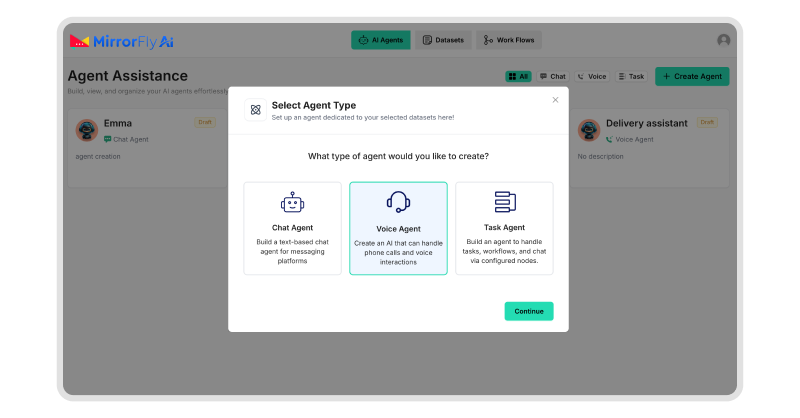
Before creating the conversation logic, I’ll usually start with the core infrastructure. It helps me decide how fast and cost-efficient my voice AI platform will be at the very start of my project.
🔹Global Model Configuration
The first thing I did was configure the global LLM settings.
In the Model Settings Tab, I clicked on the AI Model Settings dropdown. This lists down several LLM models. For most of my projects, I go with the gpt-4o-mini as the default model. I’ve seen it balance both speed and cost very well.
If the flow is complex, like outbound qualification calls, I prefer gpt-4o.
🔹Speech Provider Configuration
To enable my agent to speak or listen, I configured the STT and TTS setting in the Speech Settings Tab
We’ll need a Speech-to-Text (STT) provider to transcribe the spoken words, and a Text-to-Speech (TTS) provider to generate the agent’s voice.
Here, I used OpenAI Whisper for STT. You can also try providers like Google Speech-to-Text, Azure Speech Services, or Deepgram.
For TTS, I went with OpenAI Neural TTS. There are also options like Amazon Polly, Google Wavenet, and Azure Neural TTS.
Across each provider, I added their corresponding API key, enabled the interruption sensitivity and set it to 0.70. You can increase or decrease the sensitivity value as per your preferences.
Step 2: Ingesting Custom Knowledge Base Using RAG
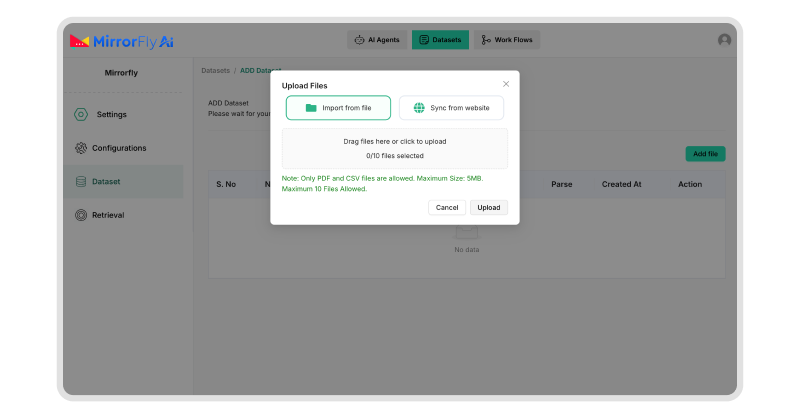
The key difference between a generic agent and a RAG-based agent is its ability to answer user questions using information from verified knowledge bases.
Since, MirrorFly is a RAG-based solution, we can use a dataset to train the agent with our brand’s information.
🔹Dataset Creation
To create my dataset, I clicked on the Dataset tab, and uploaded the following documents:
- Our company’s product documentation (PDF)
- Call scripts in TXT format
- Policy and FAQ files
- A few CSVs for structured data
In few business settings, the AI voice agent services may differ with frequently changing content. Considering these cases, I used Web Sync so the dataset could use the data from our website, without requiring our team to upload data manually.
Internally, MirrorFly AI-RAG converts every information I upload into embeddings and store them in a VectorDB.
🔹How I tuned and validated my RAG?
Before I stepped into my AI voice assistant development process, I fine-tuned how the data retrieval happens around it.
- I wanted the agent responses to be concise and voice-friendly. Hence, I adjusted the chunk token number.
- For critical documents like pricing and escalation rules, I increased the page ranks.
- To improve the recall for spoken queries, I enabled the auto keyword and question generation.
Then I used the RAGFlow Test interface extensively:
I tested with some natural questions that my customers might ask:
“What happens if I miss a payment?”
“Can you explain more about the premium plan?”
After verifying the agent responding to the questions with the correct passages for all the questions I asked, I confirmed that the retrieval is happening the right way and proceeded with the next step.
Step 3: Defining The Agent Persona and Guardrail
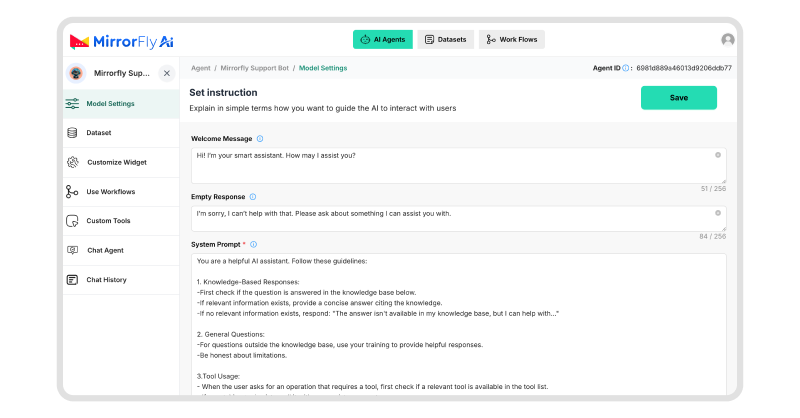
I personally love creating RAG-based AI-powered voice assistants as I get to decide who the agent is, what it must do and what it must never do.
🔹Tone and Formality
The first step to achieve this is setting up the tone and formality of the agent in the Model Settings Tab.
For most of my inbound calling, I keep it neutral to empathetic. And for outbound calling, I make it professional and concise.
These settings are simple, but they make a huge difference on how your users feel interacting with your agents.
🔹Prompt Settings
Once the tone and formality of the agent is set, I configure what messages it must respond with for welcoming the users, and when there is an empty message.
Next, I elaborate a detailed system prompt that instructs the agent to stick to the dataset strictly. This space decides what exactly my agent must do for each phase of the AI voice conversation with the user.
🔹Guardrails
In this setting, I instruct the agent what not or never to do. I set the agent’s limitations here. Some of the rules include:
- Respond only in English
- Do not commit on pricing or timelines
- Only answer queries related to the approved dataset
This way, I can make sure the agent does not off-the-track to hallucinate or respond incorrectly to user.
Step 4: Configuring Functional Actions and Tool Calling
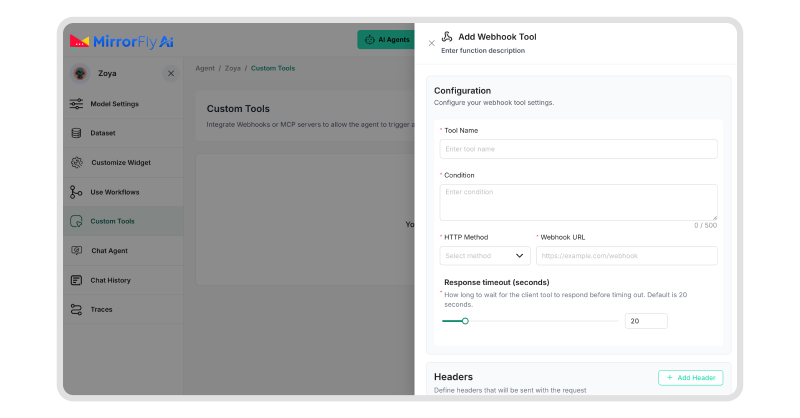
At this stage, my agent could talk. Now I made sure it could act just as I want it to.
🔹Built-in Call Actions
At some point of time, the agents might not be able to answer a customer. It might be an out of scope question or a frustrated customer who desperately need support from a human agent.
During these situations, my agent must not beat around the bush, or keep the customer in long conversations. It must think quickly and transfer the call to a number or a human agent right away.
To set this up, I have to configure a few rules:For inbound calls, my agent must analyze the sentiment and intent of the user, and trigger the transfer. For outbound calls, the transfers happen only after qualification.
I configured these SIP-based transfers with fallback numbers so the agents stays reliable for interacting with.
🔹Custom Webhook Tools
For real business actions, I added webhook tools.
One example was Book Appointment:
- A POST request was created
- Structured parameters like name, date, and phone number were passed
- Received confirmation data back into the conversation.
Throughout the flow, the agent invoked this tool dynamically using MirrorFly’s tool-calling mechanism.
Step 5: Setting Up The Agent With The Visual Workflow Builder
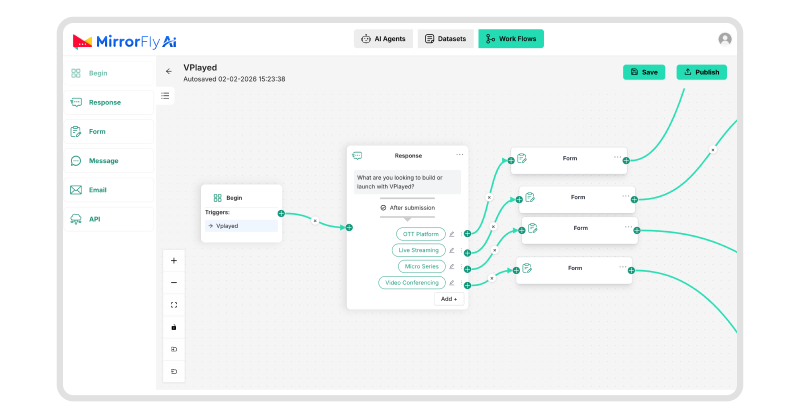
Linear prompts are never enough for setting up outbound calling flows. We’ll need a builder that lets us visualize the entire flow and MirrorFly offer it.
🔹Workflow Builder
MirrorFly’s workflow builder is backed by LangGraph. It creates every conversational flow using:
- Begin node
- AI response nodes
- Form input nodes
- API call nodes
- Conditional branches
This allows the agent to follow a strict script while still using LLM reasoning inside each step. Once the workflow was published, I attached them directly to the voice agent.
Step 6: Testing, Branding, and Audit
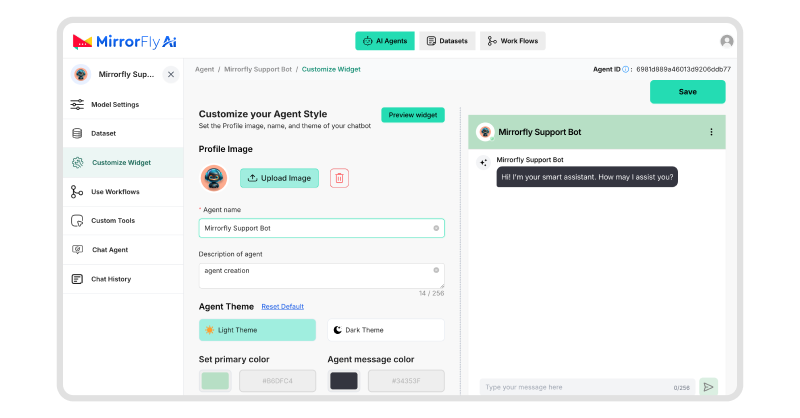
Before I took my agent live, I tested the AI voice agent platform by speaking to it directly.
🔹Testing
I checked:
- if the live transcripts were working correctly during the conversational voice demo.
- whether the responses were generated by retrieving information from the dataset chunks
Once I confirmed these items on my test list, I started customizing my agent.
🔹Branding
- I added a profile image for my agent.
- Set a dark theme that matched our AI voice agent agency.
- Applied our brand colors and elements.
🔹Call History and Monitoring
After deployment, I relied heavily on Call History:
I was able to track:
- Token usage per call, to see how many users actively engage with the agent and convert
- Full conversation transcripts: I used these real-time conversations to train and improve my agent responses even better.
- Tool invocation logs, device and session IDs to understand the customer dynamics.
My Experience using MirrorFly AI-RAG to build my Custom AI Voice Agent
Overall, I’d call MirrorFly an all-in-one solution to build hundreds of AI voice assistants for enterprises that can handle inbound and outbound calls, sticks to the business data, and follows custom workflows.
You get to use RAG, voice configurations, tool calling and workflow builder, all in one platform without having to write heavy codes all by yourself.
This is pretty much the smartest way to build AI voice software in this competitive market. You can easily build your own AI voice agent for healthcare, AI voice receptionist for appointment booking, AI voice agents for customer service or any assistant you need with 500+ custom AI agent features.
Interested in exploring it yourself? Contact MirrorFly Sales Team to learn how the solution can help your deploy your voice agents in 24 hours!
Build Your Own White-label AI Voice Assistant With MirrorFly for your business.
Connect with our specialists and get your custom build + deployment plan. Get started with our AI solution in the next few minutes!
Contact Sales Complete Ownership
-
Custom Security
-
On-Premise Hosting
 Complete Ownership
 Atchaya Jayabal leads Content at MirrorFly and is an expert in writing Tech, SaaS & B2B. She regularly publishes articles on CPaaS & Conversational AI in blogs.